Stacking Rules: When Your Link Needs to Be Smart About Location AND Time AND Device
← Back to Blog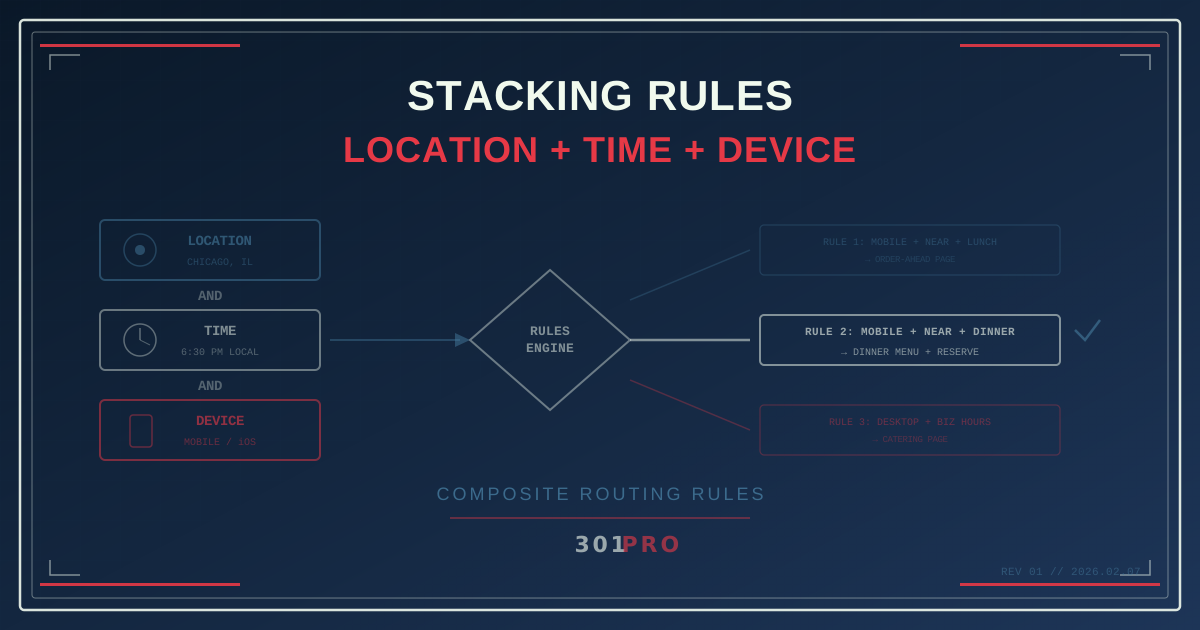
Your Links Need to Be Smarter Than a Static Redirect
You’ve seen what geo-routing can do. You’ve seen time-based routing in action. You know device detection exists. But here’s where it gets really interesting: what happens when you stack all three together?
One link. Three layers of intelligence. A customer experience that feels like it was custom-built for every single person who clicks — because, in a way, it was.
What Is Rule Stacking?
Rule stacking is combining multiple routing conditions into a single link. Instead of “if the user is in Chicago, go to the Chicago page,” you get:
“If the user is in Chicago AND it’s after 5pm AND they’re on mobile — send them to the Chicago evening mobile ordering page.”
That’s three conditions evaluated in milliseconds, producing a hyper-specific destination from a single URL.
301.Pro’s rules engine evaluates rules in priority order. Each rule can combine conditions across location, time, device, language, and more. The first rule that matches all its conditions wins. If nothing matches, the default destination catches everything else.
A Real-World Example: The Restaurant Chain
Let’s build a realistic scenario. You manage marketing for a restaurant chain with 50 locations across five states. You have one link in your Instagram bio, one QR code on your packaging, and one URL in your SMS campaigns.
Here’s what your rule stack looks like:
Rule 1 (Highest Priority): Mobile + Near a Location + Lunch Hours
Conditions:
- Device: Mobile
- Location: Within 5 miles of any store
- Time: 11am - 2pm (user’s local time)
Destination: Mobile-optimized order-ahead page for nearest location
Why: This person is on their phone, near your restaurant, during lunch. They want to order. Give them the fastest path to food.
Rule 2: Mobile + Near a Location + Dinner Hours
Conditions:
- Device: Mobile
- Location: Within 5 miles of any store
- Time: 5pm - 9pm
Destination: Dinner menu + reservation page for nearest location
Why: Dinner intent is different from lunch. They might want to sit down. Show the menu and a way to reserve.
Rule 3: Mobile + Any Location + Off-Hours
Conditions:
- Device: Mobile
- Location: Any
- Time: 9pm - 11am
Destination: Loyalty app download page (or delivery partner page)
Why: They’re on mobile but it’s outside regular dining hours. Push the loyalty program or late-night delivery.
Rule 4: Desktop + Any Location + Business Hours
Conditions:
- Device: Desktop
- Time: 9am - 6pm (Monday-Friday)
Destination: Corporate catering and group ordering page
Why: Someone on a desktop during business hours is likely planning for a team, not grabbing lunch for themselves.
Rule 5: Desktop + Any Location + Evenings/Weekends
Conditions:
- Device: Desktop
- Time: Evenings + weekends
Destination: Full menu + location finder + brand story
Why: Browsing mode. Let them explore.
Default Rule
Destination: General landing page with location finder
Why: Catch-all for anything that doesn’t match the above.
One link. Six destinations. Zero manual intervention.
How Rules Get Evaluated
Understanding evaluation order is key to building effective rule stacks. Here’s how 301.Pro processes them:
Click arrives
  ├─ Check Rule 1 conditions: Mobile? ✓ Near store? ✓ Lunch? ✓ → MATCH → Route to lunch ordering
  ├─ Check Rule 2 conditions: (skipped — Rule 1 already matched)
  └─ ...
Rules are evaluated top-to-bottom. The first match wins. This means you should order your rules from most specific to least specific:
- Most conditions → highest priority (mobile + near store + lunch)
- Fewer conditions → lower priority (desktop + business hours)
- Default → catches everything else
If you put the broadest rule first, it would match everything and the specific rules would never fire.
Three More Composite Rule Scenarios
Scenario: E-Commerce Product Launch
You’re launching a product in the US first, then Europe, then Asia.
| Priority | Conditions | Destination |
|---|---|---|
| 1 | US + Before launch day | Pre-registration page |
| 2 | US + Launch day + Mobile | Mobile shopping experience |
| 3 | US + Launch day + Desktop | Desktop product page |
| 4 | EU + Before EU launch | ”Coming to Europe” landing page |
| 5 | EU + After EU launch | EU product page (EUR pricing) |
| 6 | Asia + Before Asia launch | ”Coming to Asia” landing page |
| 7 | Asia + After Asia launch | Asia product page (local pricing) |
| Default | Global product page (USD) |
One link in the global announcement. Every market sees the right page at the right time in the right format.
Scenario: B2B SaaS with Global Sales Teams
Your sales team shares a link in email signatures and LinkedIn profiles.
| Priority | Conditions | Destination |
|---|---|---|
| 1 | US + Business hours | US sales page with live chat |
| 2 | US + After hours | US page with “Book a demo” scheduler |
| 3 | UK/EU + Business hours (GMT) | EU sales page with GDPR compliance info |
| 4 | UK/EU + After hours | EU page with demo booking |
| 5 | APAC + Business hours | APAC page with regional pricing |
| Default | Global page with timezone-aware demo scheduling |
The sales rep doesn’t need to manage multiple links for different markets. One link adapts to whoever clicks it and when.
Scenario: Political Campaign Across Districts
A statewide political campaign needs one link that works across districts:
| Priority | Conditions | Destination |
|---|---|---|
| 1 | District 1 + Mobile | District 1 mobile volunteer signup |
| 2 | District 1 + Desktop | District 1 full platform page |
| 3 | District 2 + Mobile | District 2 mobile volunteer signup |
| 4 | District 2 + Desktop | District 2 full platform page |
| 5 | Election Day + Any district | Polling location finder |
| Default | General campaign page |
One yard sign, one bumper sticker, one QR code. Every voter sees their district’s page. On Election Day, everyone sees how to vote.
Rule Stacking Best Practices
Start with the User’s Journey
Don’t start with the technology. Start with: “What does this person need at this moment?” Map out the user’s intent at different combinations of location, time, and device. Then build rules to match.
Keep Rule Counts Manageable
You can create dozens of rules, but should you? More rules mean more complexity to maintain and debug. Aim for 5-8 rules covering the major combinations, plus a strong default.
A good test: if you can’t explain your rule stack to a colleague in two minutes, you’ve overcomplicated it.
Use the Default Wisely
The default destination isn’t an afterthought — it’s your safety net. It should be your best general-purpose page, not a generic homepage. Think of it as “the page that works for everyone, even if it’s not perfectly tailored.”
Test Your Priority Order
The most common mistake is putting broad rules above specific ones. Always test with scenarios:
- “What happens when a mobile user near a store clicks at 7pm?” → Should hit Rule 2, not Rule 5
- “What happens when a desktop user clicks on a Saturday?” → Should hit Rule 5, not Rule 4
Walk through each scenario mentally before going live.
Monitor and Iterate
301.Pro’s analytics show you which rules are firing and how often. If Rule 3 never fires, maybe you don’t need it. If 80% of traffic hits the default, your rules might be too restrictive.
Use the data to tune your rules over time. The first version is never the final version.
The Power of “AND”
Single-condition routing is useful. Multi-condition routing is transformative. The difference between “send mobile users here” and “send mobile users near our store during lunch to the order-ahead page” is the difference between basic personalization and genuine contextual relevance.
Every condition you add to a rule increases its specificity — and its value to the user who matches it. A person who sees exactly the right page at exactly the right moment from exactly the right device doesn’t know your link was smart. They just think your brand gets them.
And that’s the whole point.
The Bottom Line
Rule stacking turns a link into a decision engine. Location tells you where someone is. Time tells you when they’re engaging. Device tells you how they’re browsing. Stack all three, and you know enough to deliver the exact right experience — automatically, instantly, from a single URL.
You don’t need a different link for every scenario. You need one smart link with the right rules.