Device-Based Routing: Send iPhone Users to the App Store, Everyone Else to Your Website
← Back to Blog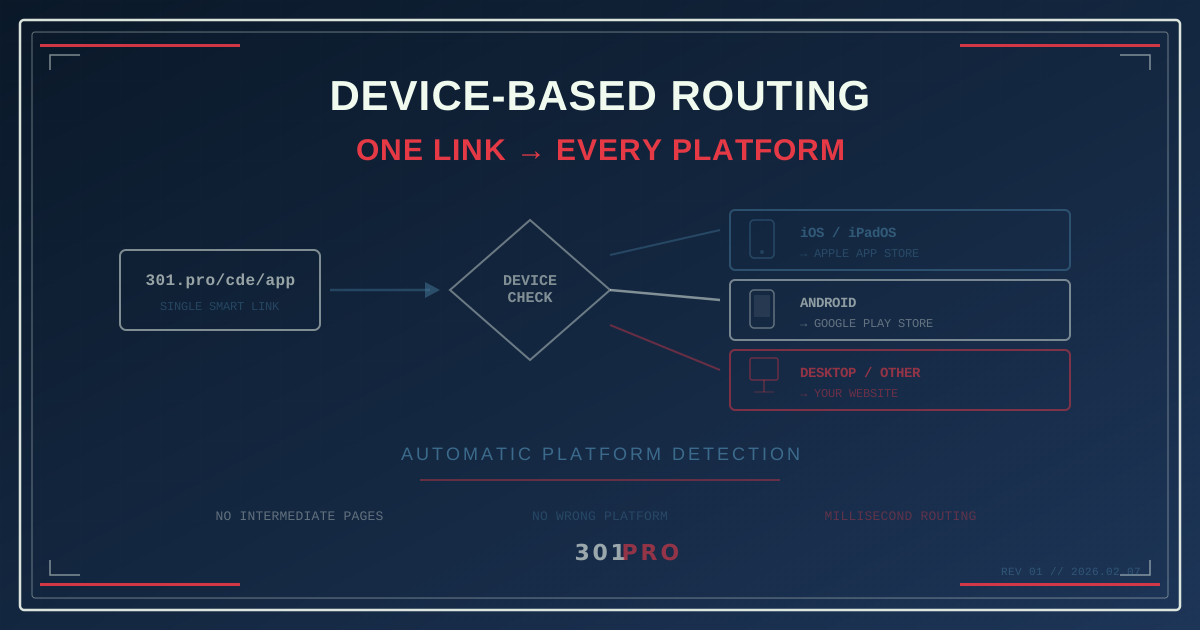
The Universal Link Problem
You just launched a mobile app. Congratulations. Now you have a new problem: where do you send people?
Your marketing email goes to 50,000 subscribers. Some are on iPhones. Some are on Android. Some are on their work laptop eating lunch at their desk. You have one link in that email. One CTA button. One shot.
If you link to the App Store, your Android users see a dead end. If you link to the Google Play Store, your iPhone users bounce. If you link to your website, both mobile audiences miss the app entirely.
The classic solution? One of those janky “Download Our App” landing pages with two big buttons — one for iOS, one for Android — and hope the user picks the right one. You know the page. It looks like it was designed in 2014 because it was.
There’s a better way.
How Device-Based Routing Works
Device-based routing inspects the device type of whoever clicks your link and sends them to the right destination automatically. No intermediate page. No “choose your platform” screen. Just instant routing to exactly where they need to be.
Here’s the logic:
| Device | Destination |
|---|---|
| iPhone / iPad | Apple App Store listing |
| Android phone / tablet | Google Play Store listing |
| Desktop / Everything else | Your website or web app |
The user clicks one URL. The routing engine checks their device, matches it against your rules, and redirects — all in milliseconds. The user never sees a routing page, never makes a choice, never wonders if they tapped the wrong button.
This is one of 301.Pro’s core routing capabilities, and it’s one of the simplest rules to set up.
Setting It Up
Step 1: Gather Your Destinations
You need three URLs:
- iOS: Your App Store listing (e.g.,
apps.apple.com/app/your-app/id123456) - Android: Your Play Store listing (e.g.,
play.google.com/store/apps/details?id=com.yourapp) - Fallback: Your website, web app, or a landing page for desktop users
Step 2: Create the Smart Link
In 301.Pro, create a link like 301.pro/cde/your-app and set up device rules:
| Priority | Condition | Destination |
|---|---|---|
| 1 | Device = iOS | App Store listing |
| 2 | Device = Android | Play Store listing |
| Default | Everything else | Website |
That’s it. Three rules, one link. Share it everywhere.
Step 3: Use It Everywhere
This single link now works in:
- Email campaigns
- Social media bios
- SMS messages
- QR codes on print materials
- Podcast show notes
- Conference slides
- Business cards
Every context, every device, one URL. The link does the thinking.
Beyond App Store Routing: Real-World Patterns
Device-based routing isn’t just for app downloads. Once you have device detection as a routing dimension, the use cases multiply.
Mobile-Optimized Checkout
Your desktop checkout has a 12-field form with address autocomplete and a progress bar. Your mobile checkout should be a streamlined 4-field flow with Apple Pay and Google Pay front and center. Route mobile users to the mobile-optimized version automatically.
App Deep Links vs. Web Pages
If someone already has your app installed, you probably want to deep link them into the app rather than opening a web page. Combine device routing with deep linking:
| Condition | Destination |
|---|---|
| iOS with app installed | Deep link into iOS app |
| iOS without app | App Store listing |
| Android with app installed | Deep link into Android app |
| Android without app | Play Store listing |
| Desktop | Web app |
Now your shared links open the app when possible and fall back gracefully when it’s not installed.
Desktop-First Experiences
Some products genuinely work better on desktop. Design tools, spreadsheet apps, video editing platforms. If someone clicks your link on a phone, route them to a “Best on desktop — we’ll email you a reminder” page instead of a cramped mobile experience that makes them think your product is bad.
Device-Specific Landing Pages
A/B testing showed your mobile landing page converts 23% better when it has a vertical video hero instead of a horizontal image carousel. Your desktop page converts better with the carousel. Device routing lets you serve the optimal page for each form factor without cramming both designs into one responsive template.
Stacking Device Rules with Other Conditions
Device detection gets more powerful when you combine it with 301.Pro’s other routing dimensions.
Device + Geography
| Condition | Destination |
|---|---|
| iOS + United States | US App Store |
| iOS + United Kingdom | UK App Store |
| Android + Any location | Play Store (universal link) |
| Desktop | Regional website |
App Store links are region-specific. A US App Store link might not work for a UK user. Device + geo routing handles this automatically.
Device + Time
| Condition | Destination |
|---|---|
| Mobile + Business hours | Schedule a demo (mobile-optimized) |
| Mobile + After hours | Download the app |
| Desktop + Business hours | Full product tour |
| Desktop + After hours | Self-serve signup |
Device + Campaign Source
Track which campaigns drive app installs vs. web signups. An SMS campaign might route mobile users to the app store (they’re already on their phone), while the same content in an email might route to the web app (email is often read on desktop).
What the Analytics Tell You
When every click goes through 301.Pro, device-based routing gives you data that platform-native analytics can’t:
- Device split: What percentage of your audience is on iOS vs. Android vs. desktop?
- Conversion by device: Does your iOS App Store listing convert better than your Play Store listing?
- Campaign effectiveness by platform: Which marketing channels drive the most mobile vs. desktop traffic?
- Time-of-day device patterns: Are your users more likely to be on mobile in the evening and desktop during work hours?
This data informs more than just routing. It shapes your entire marketing strategy. If 70% of your SMS campaign clicks come from iOS, maybe your app marketing budget should lean that direction too.
And because 301.Pro’s bot filtering separates real clicks from automated ones, you’re making decisions on actual user behavior — not inflated numbers from link preview crawlers.
Common Mistakes to Avoid
Don’t route to a mobile website when you mean the app. Mobile Safari and Chrome can handle your full website. If your goal is app installs, route to the store listing. If your goal is engagement, route to the web app. Be intentional.
Don’t forget tablets. iPads and Android tablets are neither phones nor desktops. Decide whether tablet users should get the mobile app, the desktop site, or something specific to their form factor.
Don’t ignore the fallback. Some users will click from unusual devices — smart TVs, gaming consoles, in-car browsers. Your default rule catches everything your specific rules don’t. Make it a useful destination, not a 404.
Don’t create separate links when one will do. If you have app.yoursite.com/ios, app.yoursite.com/android, and app.yoursite.com/web — you’re maintaining three URLs when you need one. One smart link, three rules, zero confusion.
The Bottom Line
Every time you share a link, you’re making an assumption about who will click it and what device they’ll be on. Device-based routing removes that assumption entirely.
One link. Every device gets the right destination. No intermediate pages, no wrong platform errors, no “download our app” pages from 2014.
Your users don’t think about what device they’re on. Your links shouldn’t have to either.