Click Truth: Knowing Exactly Who Clicked Your SMS Link (Without Being Creepy)
← Back to Blog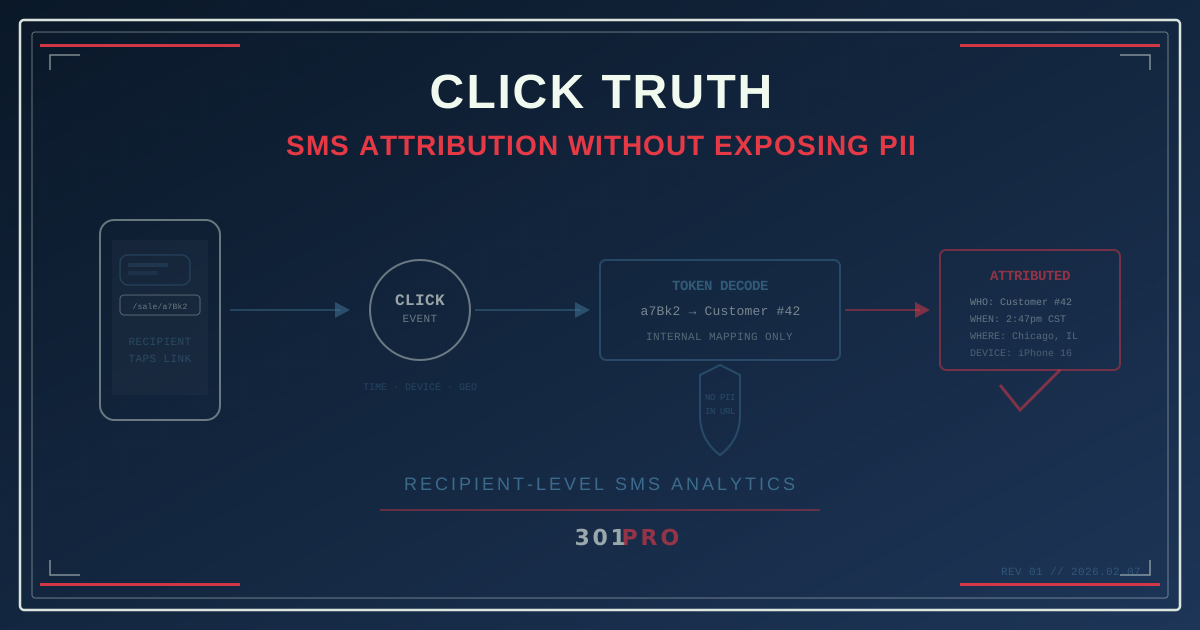
The SMS Attribution Paradox
Here’s what’s weird about SMS marketing: you know more about who you’re messaging than any other channel — and less about what happens after.
When you send an email, your ESP tracks opens, clicks, and conversions tied to an email address. When you run a paid ad, the platform tracks impressions and clicks tied to an audience segment. But when you send an SMS with a link inside it? Your SMS platform knows the message was delivered. And then… silence. Someone clicked the link. But who?
Your SMS platform knows the phone number. Your link analytics know the click happened. But connecting the two? That’s where most teams hit a wall.
The brute-force approach — appending the phone number to the URL — is a privacy nightmare. The smarter approach uses encoded identifiers that connect the dots without exposing anyone’s personal data.
Why Standard Link Analytics Aren’t Enough
When you put a standard short link in an SMS message, the analytics tell you:
- Someone clicked at 2:47pm
- They were on an iPhone in Chicago
- They spent 3 minutes on the landing page
Useful, but incomplete. You sent that SMS to 15,000 people. Which one of them clicked? Was it the customer who’s been on the fence about upgrading? The one who already bought? The one you’re about to lose to a competitor?
Without tying the click back to the recipient, SMS analytics are just aggregate numbers. You know what happened but not who it happened to.
The Wrong Way: Naked PII in URLs
The obvious solution is to append identifying information to the link:
301.pro/cde/sale?phone=5551234567This is terrible for multiple reasons:
-
The URL is visible. The recipient can see their phone number in the link before they click. That’s unsettling.
-
URLs get shared. If the recipient forwards the message or shares the link on social media, their phone number goes with it.
-
Server logs capture it. Every system between the click and the destination — CDNs, analytics platforms, browser history — now has a PII-laden URL logged.
-
Compliance nightmare. TCPA, GDPR, and CCPA all have things to say about transmitting personal identifiers in plaintext through third-party systems.
-
Screenshots and screen sharing. The URL bar shows the phone number to anyone looking at the user’s screen.
Don’t do this. Not even with email addresses. Not even with “anonymized” identifiers that are obviously just base64-encoded phone numbers (security through obscurity is not security).
Click Truth: The Right Way
301.Pro’s Click Truth approach solves this by encoding recipient identity in a way that’s:
- Opaque to the user — the URL contains a short identifier, not recognizable PII
- Meaningful to your system — the identifier maps back to the recipient in your database
- Unique per send — each recipient gets a unique link variant
- Privacy-compliant — no personal data transits through the URL
Here’s how it works in practice.
Step 1: Generate Unique Links Per Recipient
Instead of one link for all 15,000 recipients, you generate a link per phone number:
| Recipient | SMS Link |
|---|---|
| (555) 123-4567 | 301.pro/cde/sale/a7Bk2 |
| (555) 234-5678 | 301.pro/cde/sale/m9Qr5 |
| (555) 345-6789 | 301.pro/cde/sale/x3Fn8 |
Each suffix is a unique, opaque token. The recipient sees a normal-looking link. They have no way to know the token maps to their phone number. Neither does anyone who sees the URL in a server log or browser history.
Step 2: Map Tokens to Recipients
In your 301.Pro dashboard (or via the API), each token maps to a recipient identifier in your system. When someone clicks 301.pro/cde/sale/a7Bk2, the click is attributed to phone number (555) 123-4567 — but the phone number never appears in the URL, the redirect chain, or the destination page analytics.
Step 3: Route and Track
All the same smart routing applies. The link can route based on time, device, location — plus now you have recipient-level attribution. Your analytics now show:
- Who clicked: The specific recipient, identified by your internal token
- When they clicked: Timestamp with timezone
- Where they clicked: Geographic location (city/metro level)
- What device: iOS, Android, desktop
- What happened next: If connected to your CRM, the full post-click journey
What This Unlocks
Individual-Level Attribution
Your SMS campaign promoted a weekend sale. Of 15,000 recipients:
- 2,100 clicked the link (14% CTR)
- But which 2,100?
With Click Truth, you know exactly. You can now:
- Segment by engagement: Build a “clicked the sale link” segment for follow-up
- Identify non-clickers: The 12,900 who didn’t click might need a different approach — or a second nudge
- Score leads: A click from a prospect who’s been evaluating your product is worth more than a click from a loyal customer browsing deals
- Close the attribution loop: If someone clicks the SMS link and buys 48 hours later, you can attribute the sale to the specific SMS send
Real-Time Webhook Triggers
301.Pro can fire a webhook the instant someone clicks. Combined with Click Truth, the webhook payload includes the recipient identifier. This means:
- Your CRM gets updated in real time when a specific customer engages
- Your sales team can be notified when a high-value prospect clicks
- Your automation platform can trigger a follow-up sequence based on who clicked and when
- A/B test results can be evaluated at the individual level, not just aggregate
Multi-Touch SMS Journeys
If you send multiple SMS messages to the same recipient over time, each with a unique Click Truth link, you build a click-level journey:
| Date | Message | Link | Clicked? |
|---|---|---|---|
| Feb 1 | Welcome SMS | sale/a7Bk2 | Yes (2min later) |
| Feb 8 | Product highlight | prod/a7Bk2 | No |
| Feb 15 | Last chance sale | last/a7Bk2 | Yes (4hrs later) |
| Feb 22 | Loyalty offer | loyal/a7Bk2 | Yes (immediate) |
Now you know this recipient’s engagement pattern: they respond to time-sensitive offers (sale + last chance) but ignore informational content (product highlight). That’s actionable intelligence for how to message them going forward.
Privacy by Design
Click Truth is built around a principle: the least amount of personal data possible should travel through the URL chain.
What Travels Through the URL
- An opaque token (
a7Bk2) — no PII, no identifiable meaning to anyone except your system
What Stays in Your System
- The mapping between token and phone number — stored in your 301.Pro account or CRM
- The phone number itself — never transmitted in the URL
What Gets Captured at Click Time
- Click metadata (time, device, location) — enriched by 301.Pro’s CDE
- The token — which your system resolves to a recipient
This is fundamentally different from tracking pixels, cookie-based attribution, or URL parameter tracking. There’s no surveillance mechanism running in the background. There’s just a link that a person chose to click, with an identifier that your system understands.
Practical Implementation
For Small Campaigns (Under 1,000 Recipients)
You can generate unique links manually through the 301.Pro dashboard. Create link variants, assign tokens, and export a CSV mapping tokens to phone numbers. Upload to your SMS platform and send.
For Large Campaigns (1,000+ Recipients)
Use the 301.Pro API to programmatically generate link variants:
- Your SMS platform prepares the send list
- Your system calls the 301.Pro API to generate a unique link per recipient
- The API returns tokens mapped to your internal IDs
- Your SMS platform inserts the personalized link into each message
- Clicks fire webhooks back to your system with the token
The entire flow is automated. No manual mapping, no CSV gymnastics, no human touching phone numbers.
Integration with SMS Platforms
Most modern SMS platforms (Twilio, MessageBird, Vonage, etc.) support dynamic link insertion per recipient. Your message template includes a variable:
Flash sale this weekend! Shop now: {link}Each recipient gets their unique Click Truth link in the {link} variable. They see a normal SMS with a normal link. Your system sees a traceable, attributable, privacy-safe click event.
Bot Filtering Matters Here Too
SMS links are popular targets for link-scanning bots. When a carrier or security system scans the link to check for malware, it registers as a “click.” Without bot filtering, your Click Truth data gets polluted:
- Carrier scanners might “click” every link before delivery
- Security platforms might preview links as part of message inspection
- Some SMS apps generate link previews that trigger server-side requests
301.Pro’s Intelligent Bot Management filters these automated clicks, so your Click Truth data reflects actual human engagement. When you see that recipient a7Bk2 clicked at 2:47pm, that was a real person on a real phone — not a Twilio carrier probe.
The Bottom Line
SMS is the most personal marketing channel. You have the recipient’s phone number. You’re in their text messages. The least you can do is know what they did with the link you sent them.
Click Truth bridges the gap between “someone clicked” and “this specific customer clicked.” It does it without exposing personal data, without creepy URL parameters, and without violating privacy regulations.
Know who clicked. Respect how you know it.