Why Your Click Numbers Are Lying to You (And How to Fix It)
← Back to Blog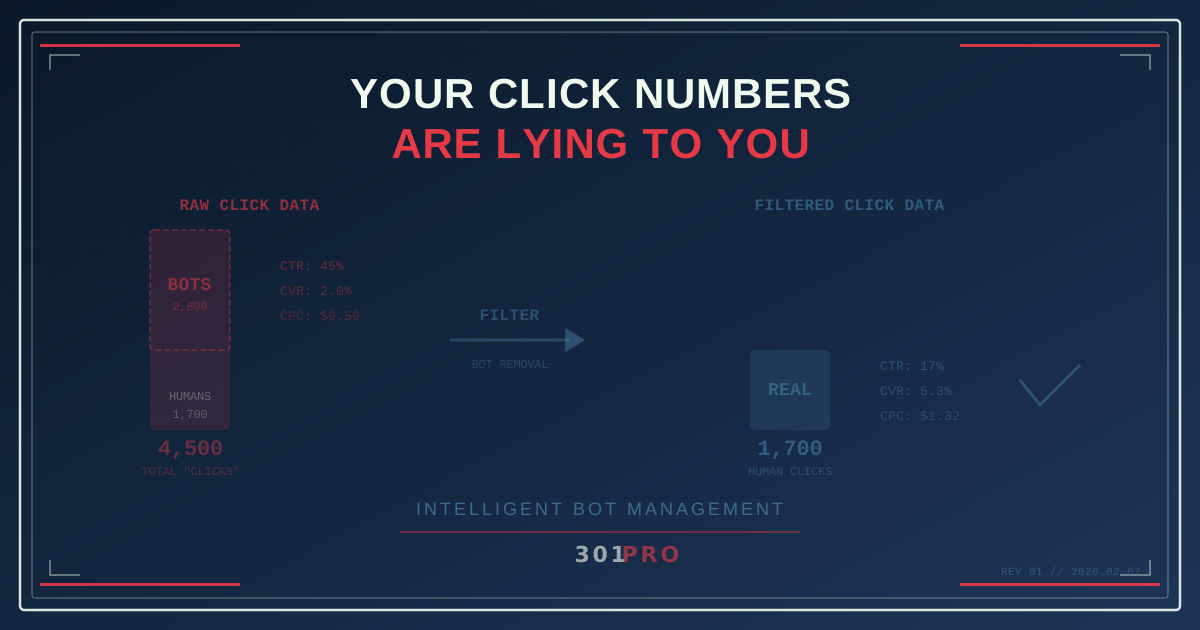
Your Best Campaign Was a Lie
You sent an email to 10,000 subscribers last Tuesday. Your email platform reports 4,500 clicks. A 45% click-through rate. You high-five the marketing team. You screenshot the dashboard and share it in Slack. The CMO nods approvingly in the weekly standup.
One problem: about 2,800 of those “clicks” were machines. Security scanners. Link preview generators. Email protection services. Bots that exist specifically to check whether your links are safe before a human ever sees the email.
Your real click-through rate? Closer to 17%. Still good — but not the unicorn result you were celebrating.
This isn’t a rare edge case. It’s happening to every marketer, on every campaign, right now. And if you’re not filtering bot traffic from your click data, every decision you make based on those numbers is based on fiction.
Where the Fake Clicks Come From
Email Security Scanners
Enterprise email systems (Microsoft Defender, Proofpoint, Barracuda, Mimecast) scan every link in every incoming email before delivering it to the recipient’s inbox. The scanner clicks the link, follows the redirect chain, checks the destination for malware, and then delivers the email.
From your analytics perspective, that scanner click looks identical to a human click. Same HTTP request. Same redirect. Same “click” in your dashboard. But no human was involved.
If 30% of your email list uses corporate email with link scanning, 30% of your “clicks” are bots. Period.
Link Preview Generators
When someone receives a message with a link (iMessage, Slack, WhatsApp, LinkedIn, Twitter), the platform generates a preview. To do that, it fetches the URL. Your analytics see a “click.”
Some platforms are polite about this (they identify themselves in the user agent). Some aren’t. And some — like Apple’s Mail Privacy Protection — aggressively pre-fetch links to protect user privacy, generating “clicks” from every recipient regardless of whether they engaged.
Web Crawlers and Indexers
Search engine crawlers, social media indexers, and various web services regularly crawl URLs they discover. If your short link appears anywhere public — a social post, a website, a directory — crawlers will hit it. Each hit registers as a “click.”
Monitoring and Uptime Services
Some companies use link monitoring tools that periodically check whether URLs are still active. These automated checks register as clicks in your analytics.
The Real Cost of Inflated Numbers
Fake clicks aren’t just a vanity problem. They corrupt every metric downstream.
Conversion Rate Collapse
If your raw data shows 4,500 clicks and 90 conversions, your conversion rate is 2%. But if 2,800 of those clicks were bots, your actual human click count is 1,700 — and your real conversion rate is 5.3%. That’s a completely different story. It means your landing page is actually performing well, but you’d never know it from the raw numbers.
Channel Comparison Skew
Email consistently has the highest bot traffic because of security scanners. If you’re comparing email CTR (inflated by bots) to social media CTR (less bot-inflated), email looks like your best channel when it might not be.
A/B Test Invalidation
You ran an A/B test on email subject lines. Version A got 1,200 clicks, Version B got 1,050 clicks. Version A wins? Not necessarily. If Version A went to more corporate email accounts (more security scanners = more bot clicks), the “winner” was determined by which list had more bots.
Budget Misallocation
Your team allocates budget based on cost-per-click. If half your clicks are bots, you’re paying double the real CPC. That campaign that looked efficient at $0.50 per click is actually $1.00 per real human click.
Report Credibility
When your numbers swing wildly from campaign to campaign for no apparent reason, people lose trust in the data. “Last month email had 45% CTR, this month it’s 12% — what happened?” Nothing happened. Last month’s list had more corporate email addresses. This month’s had more personal Gmail accounts. The humans behaved the same.
How to Tell Real Clicks from Fake Ones
Behavioral Signals
Real human clicks have patterns that bots don’t:
| Signal | Human Click | Bot Click |
|---|---|---|
| Time after email delivery | Minutes to hours | Milliseconds to seconds |
| Click → page load sequence | Click, then page loads | Click only (no page load) |
| Geographic consistency | Matches subscriber location | Random or datacenter IPs |
| User agent | Consumer browsers | Generic or missing |
| Click timing | Varied, unpredictable | Uniform, immediate |
| Multiple links clicked | Sometimes | Often (scans every link) |
| Follow-up engagement | Sometimes | Never |
A security scanner clicks every link in an email within 2 seconds of delivery, from a datacenter IP, with a generic user agent. A human opens the email 47 minutes later, reads it, and clicks one link from their phone in Denver.
IP-Based Detection
Many bot clicks originate from known datacenter IP ranges (AWS, Azure, Google Cloud) or from IP blocks associated with email security services. Real human clicks come from residential or mobile ISP ranges.
JavaScript Execution
Bots typically don’t execute JavaScript. If your landing page includes JavaScript-based analytics (like 301.Pro’s First Party Pixel), the pixel fires for humans but not for bots. Comparing server-side click counts to client-side pixel fires reveals the gap.
How 301.Pro Filters Bot Traffic
301.Pro’s Intelligent Bot Management uses multiple signals to classify clicks in real time:
Multi-Signal Classification
Instead of relying on a single indicator (which bots can spoof), the system examines multiple signals simultaneously:
- Request timing relative to message delivery
- IP reputation and classification
- User agent analysis and consistency
- Behavioral patterns across the click chain
- Known bot signature matching
- TLS fingerprinting
A click must pass multiple checks to be classified as human. This layered approach catches sophisticated bots that might fool any single detector.
Real-Time Processing
Bot classification happens during the redirect — not after. When someone (or something) clicks your 301.Pro link, the system evaluates the click and tags it before the redirect fires. Your analytics dashboard shows human clicks and bot clicks separately, in real time.
The Analytics Split
Your 301.Pro dashboard shows both raw and filtered numbers:
| Metric | Raw (All Clicks) | Filtered (Humans Only) |
|---|---|---|
| Total clicks | 4,500 | 1,700 |
| Click-through rate | 45% | 17% |
| Conversion rate | 2.0% | 5.3% |
| Cost per click | $0.50 | $1.32 |
| Top city | Ashburn, VA (datacenter) | Chicago, IL |
The “Top city” line is telling. Ashburn, Virginia is home to major AWS datacenters. If your top click location is a datacenter town, your data is bot-heavy.
What to Do About It
Step 1: Audit Your Current Data
Look at your most recent email campaign. Check:
- What percentage of clicks happened within 10 seconds of delivery? (Bot indicator)
- What are your top click locations? (Datacenter cities = bots)
- How does your click count compare to your landing page views? (Big gap = bots)
- Do clicks spike immediately after sending and then flatline? (Bot scanner pattern)
Step 2: Implement Bot Filtering
If your link management platform doesn’t filter bots, switch to one that does. This isn’t optional anymore — it’s the difference between data you can trust and data that leads you astray.
301.Pro’s Intelligent Bot Management filters automated traffic across all your links. The filtered data feeds your dashboards, webhooks, and exports.
Step 3: Re-Baseline Your Metrics
Once you have clean data, your numbers will look different. CTRs will drop. Conversion rates will increase. Channel comparisons will shift. That’s not bad news — it’s accurate news.
Set new baselines with filtered data. A 17% real CTR is better than a 45% fake CTR, because you can actually make decisions on it.
Step 4: Educate Your Team
The marketing team, the executives, and especially the people who receive your reports need to understand the change. “Our click numbers went down” is scary without context. “Our click numbers now reflect real humans, and our conversion rate nearly tripled” tells the right story.
Step 5: Update Your Attribution Models
If your attribution model uses click data, the filtered numbers will change your channel mix. Email might drop in attributed conversions (fewer fake clicks), while channels with less bot traffic might rise. This is your model becoming more accurate, not your channels getting worse.
The Bottom Line
Your click numbers are a mix of humans and machines. The machines don’t buy your product, sign up for your service, or become loyal customers. They’re noise — and they’re making your data worse, not better.
Filter the bots. See the real numbers. Make decisions on data that reflects actual human behavior.
Honestly, you might prefer the real numbers. They’re lower, but they’re real. And real is the only thing you can optimize.